
Browser-based parametric 3D accessories builder
Design Printable 3D Accessories in Your Browser
Start with a template, customize it live, and export STL without CAD.
Live previewSTL export readyTemplate-basedBuilt for 3D printingNo CAD required
Start from a template
Start from a printable accessory template
Chainly starts with keychains, tags, and custom shape workflows today, while the product direction stays open for broader printable 3D accessories over time.
How it works
From template selection to STL export in THREE Steps
The workflow should feel obvious to non-technical users: choose a template, customize the parametric fields, then export a printable file.
- 01
Choose a template
Pick a name tag, QR tag, pet ID tag, or custom shape accessory flow instead of starting from a blank CAD scene.
- 02
Customize text, shape, and size
Adjust live parametric controls for text, dimensions, keyring placement, and depth while the 3D preview updates.
- 03
Export STL for 3D printing
Download a print-ready STL once the design looks right, then move straight into slicing and production.
See the parametric controls
This is a live 3D accessories builder, not a static template picker
The mini demo below exposes real editable fields and a real model preview so visitors understand Chainly is a technical, browser-based design tool that starts with accessories today.
Guided live demo
Adjust the parametric controls
This guided demo uses a real template definition. Edit the text, font, tag shape, corner radius, thickness, and keyring position to see how the printable model changes.
Validation ready
The demo stays inside the printable constraints defined by the current name-tag template.
From idea to printed result
Bridge the concept, the 3D preview, and the physical output
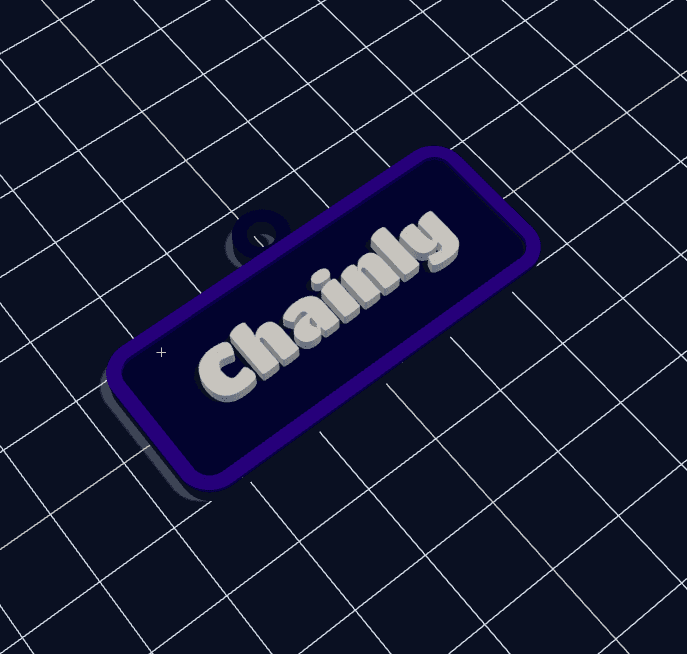
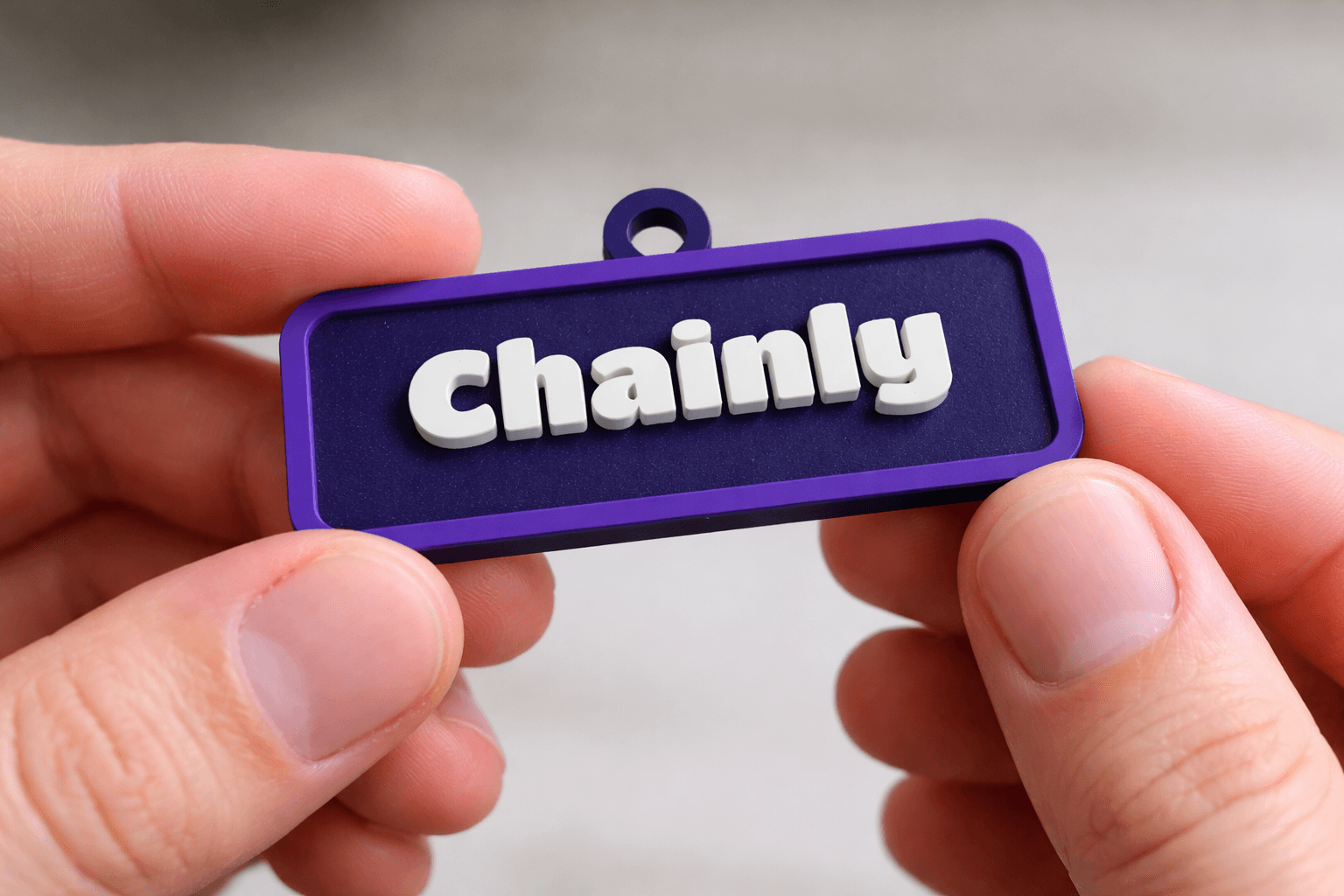
Even without a real print photo library yet, the landing page should show that designs move from user input to an export-ready file and then into a printed object.
01 Concept input
Template: Name tag
Text: CHAINLY
Shape: Tag
Depth: 3.0 mm
02 3D render preview
03 STL or print preview
chainly-name-tag.stl
Format: STL
Bounds: 58.0 x 24.0 x 4.8 mm
Status: Printable
04 Printed result
Popular use cases
One tool, multiple printable product paths
These cards broaden relevance without making the page feel generic. Each use case stays grounded in a real template or editor flow that already exists today.
Custom names and short messages
Gifts
Design one-off custom 3D keychains for birthdays, couples, and keepsakes with a fast browser workflow.
Explore flowContact info and durable tags
Pets
Create pet ID tags with embossed text and wall-safe hole placement for real collars.
Explore flowAttendee giveaways and passes
Events
Use template-based event giveaway tags when you need repeatable sizing and quick personalization.
Explore flowShort runs and branded drops
Creator merch
Turn names, catchphrases, or logo shapes into printable creator merch without a long modeling workflow.
Explore flowPromo tags and product inserts
Small business branding
Build business promo tags that link to menus, stores, or social profiles through a QR code keychain maker flow.
Explore flowProfiles, links, and contact sharing
QR contact tags
Generate QR code keychains with browser-based sizing, hole position controls, and export-ready surfaces.
Explore flowTraditional CAD vs this app
Why this workflow is easier for BEGINNERS
The comparison is meant to reduce friction, not attack CAD. It explains why an accessory-focused template workflow can be more practical for personalized printable products.
| Category | Traditional CAD | This app |
|---|---|---|
| Learning curve | Modeling tools and print prep take time to learn. | Beginner-friendly template controls keep the workflow approachable. |
| Speed | You model geometry manually before seeing a usable accessory. | Template-based flows get you to a printable accessory in minutes. |
| Print setup | Thickness, spacing, and hole placement are manual checks. | Print-aware defaults and validation keep common mistakes visible. |
| Workflow focus | Generic modeling workflow for any object. | Accessory-focused template builder tuned for names, QR tags, pet tags, and printable templates. |
FAQ
Questions users are likely to ask before they start
The answers below handle objections, improve search coverage, and keep the copy grounded in what the product actually does today.
Do I need 3D modeling experience?
No. Chainly is designed as a browser-based parametric 3D accessories builder, so you work with template controls instead of a full CAD workspace.
You can start with a template, edit text, size, and shape, and see the result in a live preview without learning traditional modeling tools first. Today that starts with keychains, QR tags, pet ID tags, and custom shapes.
Can I export STL directly?
Yes. The editor is built around print-ready output, and STL export is the core file path for 3D printing workflows.
Availability follows the current plan or license rules inside the app, but the landing page experience is designed so users can start designing immediately.
Is this suitable for 3D printing?
Yes. The product is positioned around real printable output, not just a decorative mockup.
Current template logic already accounts for geometry constraints such as thickness, readable text sizing, hole placement safety, and export-ready solids where relevant.
Can I create QR code keychains?
Yes. There is an existing QR code template flow with live preview and browser-side controls for size, corner radius, thickness, and hole position.
That makes the landing page relevant for search intents like QR code keychain maker and STL keychain generator while staying truthful to the product.
Can I customize the shape and hole position?
Yes. Different templates expose different parametric controls, including shape selection, corner radius, extrusion depth, and keyring or hole placement settings.
The exact control set depends on the chosen template because a pet ID tag, a QR tag, and a name keychain do not share the same geometry model.
Will it work on mobile?
The landing page is designed to remain fully readable and tappable on mobile, with lightweight interactions and a sticky start CTA.
The editor itself works best on a modern browser with enough screen space for controls and 3D preview, so desktop and tablet remain the strongest design experience.
Can I use templates for business products?
Yes. Business promo tags, QR contact tags, creator merch, and event giveaways are all valid use cases for the current product direction.
The landing page should route these users into the nearest existing editor flow now, then expand into dedicated template entry pages later.
Start designing
Start Designing with Chainly
Begin with a printable accessory template, customize it live, and export STL in minutes.
Start Designing